
How to #Hashtag for Recruitment Success
Nicole Clarke • August 20, 2021
Hashtag for Recruitment Success
Hashtags are great, when you know how to use them. Before hashtagging everything in sight, remember this: on Facebook, LinkedIn and Twitter use 1-2 tags for best results; and aim for 5-10 on Instagram, 2-3 for YouTube, 2-5 for Pinterest, these a
re said to be
optimal
.
How hashtags can help you reach the out-crowd and engage the in-crowd To use hashtags for advertising or not to use hashtags for advertising? This is a question that haunts both digital advertising teams and individual business owners. A Twitter study found that using hashtags increases audience engagement by 50% for brands and up to 100% for individuals. According to other researchers, a post with at least one hashtag receives 392 percent more comments and 70 percent more likes.
Hashtag basics
The hashtag (#) turns any word, or group of words, into a link that can be searched. When writing a hashtag, leave your grammar at the door – no punctuation, no spaces! The best way to keep your message clear is to capitalize each word #LikeThis, otherwise known as using CamelCase. Got it? Let’s move on!
There are two ways businesses can use hashtags to their advantage.
Reaching the out-crowd
As a business, using hashtags to reach potential new customers is a no-brainer. How do you do this effectively? By joining a conversation that is already in progress! Start thinking about what words people would search when looking for a recruitment business like yours. If you don’t know where to start, remember the old saying, “Keep your friends close, and your competitors closer”! Follow businesses who are doing similar work to you on all your favorite social media websites – especially those who have a great following. What hashtags are they using, and how many? Keep in mind that less is more both in scope (as hashtags that are more niche have a more engaged following) and in presentation.
For example, "this is an amazing civil engineering job in Perth" #engineer #jobs #engineeringjobs #civilengineer #Perth
So, K.I.S.S. – Keep It Simple Social-Media-User! Using hashtags by joining a pre-existing conversation takes your business and puts it in front of someone who would have never found you otherwise. That’s something you can feel #Blessed about!
Engaging the in-crowd
The second way that you can use hashtags to build your business is by starting a conversation with the followers that you already have by creating an original hashtag. Brands from Calvin Klein (#MyCalvins) to Charmin toilet paper (#TweetFromTheSeat) have managed to create original hashtags that engage their audience in a way that builds their social media momentum . Original hashtags can be used for promotions, contests, events, or general brand awareness. Just be sure that when you are creating an original hashtag that it is clear, simple, unique, and catchy. No one will want to join your conversation if it’s confusing or boring.
Imagine if Coca-Cola’s classic #ShareACoke hashtag was #TakeACocaColaAndGiveItToSomeoneElse – not very fun or memorable! Original hashtags give your followers something to talk about and a way to interact with your business on a personal level.
Not all social media sites are created equal
Using hashtags is not a one-size-fits-all solution. Each platform will have its unspoken rules of how many hashtags are acceptable. Where Instagram shows posts with an average of nine hashtags performing the best, Facebook posts get the greatest engagement with only one hashtag . Each social media site is unique in its function and audience, so take the time to explore the sites you want to use for your business before posting.
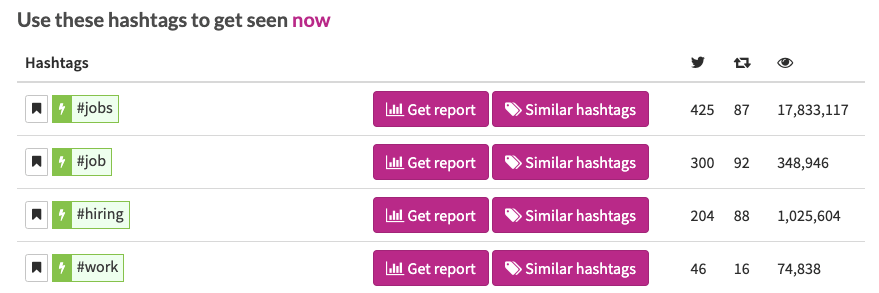
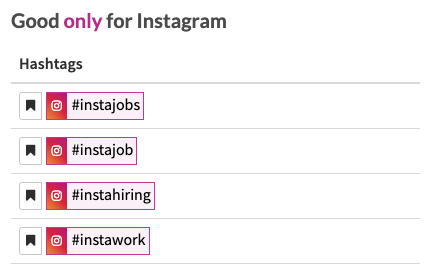
Popular hashtags for jobs on Twitter & Instagram are as below.
Are you #Trending yet?
These tips and tricks for how to use hashtags as a business are about more than getting ahead in a technological age. Hashtags, above all, are about building community. By putting a simple pound sign in front of a word, you are taking that message and immediately sharing it with someone who cares about what you do and how you do it. This tool is a revolutionary way to make your words matter and allow them to connect with not only a new customer, but a new spokesperson for your business. From #MotivationalMonday to #FlashbackFriday, use your new hashtagging skills to make both the in-crowd and the out-crowd your new #BFFL.

By Nicole Clarke
•
October 28, 2025
How to Track Your LinkedIn Leads (and Finally See What’s Working) Most recruitment agencies post regularly on LinkedIn, but few actually know what’s working. You might get great engagement, but how do you know if those likes and clicks are turning into new clients or candidate enquiries? If you’re not tracking your leads, you’re flying blind. The good news is that it’s incredibly easy to fix. You just need a simple setup using UTM tracking and Google Analytics (GA4) . Here’s how to do it properly so you can see exactly which posts, people, and campaigns are driving real results. Step 1: Add UTM Links to Every LinkedIn Post Whenever you share a link on LinkedIn, whether it’s to a job, a blog, other content or a “book a demo” page etc you should add a little bit of tracking code at the end of your URL. This code is called a UTM , and it tells you exactly where your traffic came from once people land on your website. Example: https://www.xyzrecruitment.com/book-demo?utm_source=linkedin&utm_medium=social&utm_campaign=demo_launch&utm_content=post1 Here’s what each tag means: utm_source=linkedin → tells you the traffic came from LinkedIn utm_medium=social → identifies it as an organic social post utm_campaign=demo_launch → labels your specific campaign utm_content=post1 → helps you see which post or person shared it You can use Google’s free Campaign URL Builder to generate these in seconds. Step 2: Use Tagged Links in Every Post and Profile Once you’ve created your UTM-tagged links, use them everywhere you share links from LinkedIn: Company updates Recruiter and consultant posts LinkedIn articles or newsletters Comments and DMs If multiple people in your team are posting, give each person their own UTM content tag (for example: utm_content=sarah_post or utm_content=liam_article ) so you can easily see who’s driving the most traffic or conversions. Step 3: Track the Results in Google Analytics 4 With your UTM links live, it’s time to see what’s working. In Google Analytics (GA4) , go to: Reports → Acquisition → Traffic Acquisition Filter by: Source / Medium = linkedin / social Now you’ll see: How many visitors came from LinkedIn Which pages they viewed Whether they filled out a form, booked a demo, or applied for a role That’s how you finally connect your LinkedIn activity to actual business outcomes. Step 4: If You Run Paid Ads — Connect LinkedIn to GA4 If you’re also running LinkedIn Ads , connect your LinkedIn Campaign Manager to GA4 . This gives you the complete picture, not just clicks and impressions, but which ads and audiences are driving conversions. Step 5: Create a Simple Dashboard Once you’re tracking everything, pull it together in a Google Looker Studio (Data Studio) dashboard. You’ll get a clear visual of: Traffic from LinkedIn (organic + paid) Conversions by campaign Which recruiters generate the most leads Your overall ROI from LinkedIn It’s simple, visual, and finally gives you proof of what’s working. Why This Matters for Recruitment Agencies Without UTM tracking, your LinkedIn traffic shows up in Google Analytics as “direct” or “referral”, which tells you nothing. With proper tracking, you’ll know: Which campaigns or posts bring in new client leads Which recruiters or consultants drive the most engagement What content types actually convert It’s not about guessing, it’s about growing with real data. Quick Recap Step 1: Add UTM links to every LinkedIn post — Tracks traffic accurately Step 2: Use consistent naming — Keeps your data clean Step 3: Check GA4 reports — See conversions clearly Step 4: Connect LinkedIn Ads — Measure full ROI Step 5: Build a dashboard — See what’s working at a glance Final Tip Consistency is key! One untagged link can throw off your data. Once you start tracking properly, you’ll quickly see which content drives leads and where to focus your marketing energy next. If you’d like help setting up UTM links or building a simple LinkedIn-to-GA4 dashboard, contact the team at www.shazamme.com we can show you exactly how to do it right!