You post a great piece of content on the company page. You drop the link into Teams and ask everyone to share it. By Friday, two people have. One of them wrote the post.
Sound familiar? The people with the most relevant networks are often your recruiters. The consultant who spends every day talking to healthcare candidates or engineering hiring managers already knows what those people want to hear. Giving them another thing to remember is a fairly reliable way to keep that knowledge in the group chat.
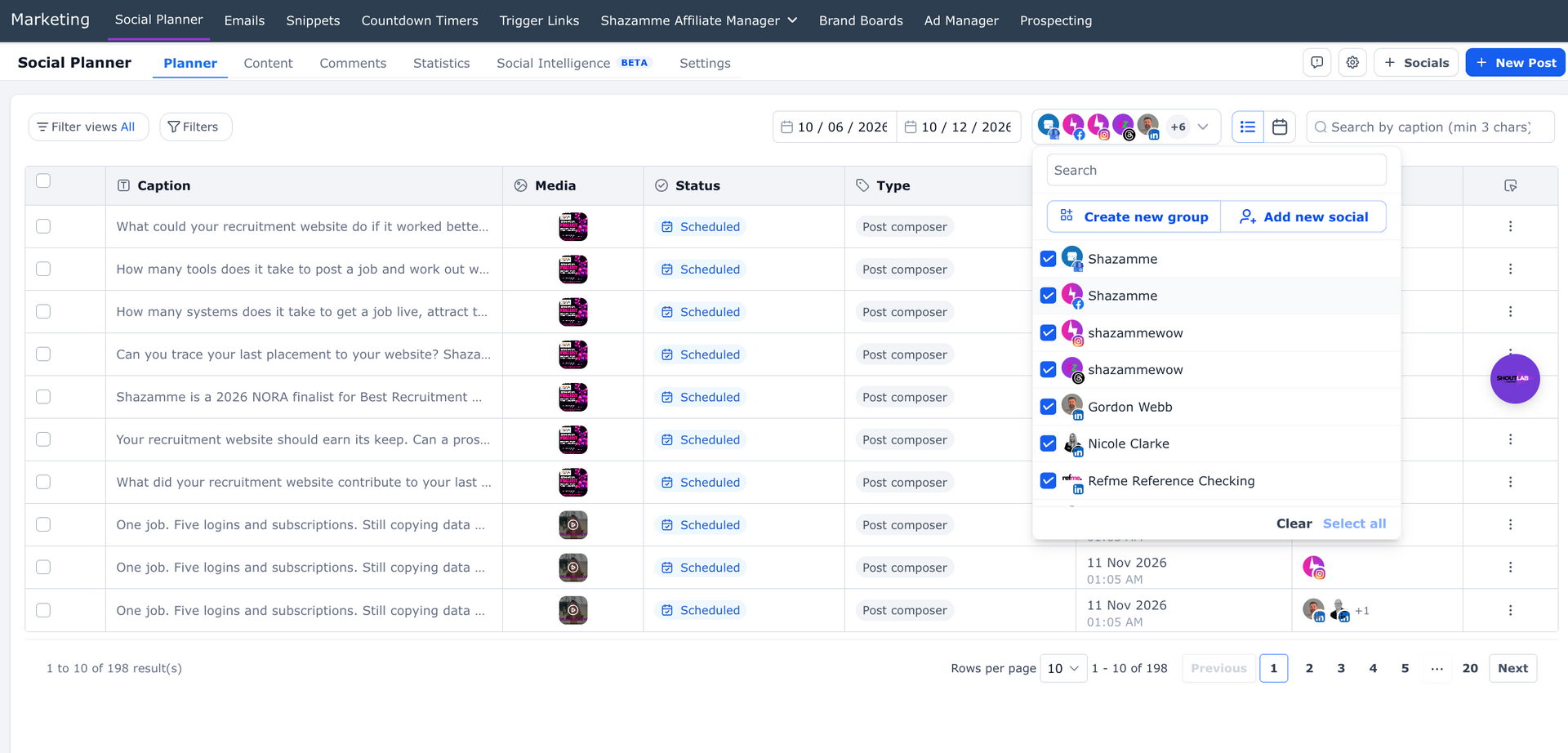
Shoutlab by Shazamme is a social media posting tool for recruitment and staffing agencies. It lets marketing plan and schedule content from one calendar for the company LinkedIn page, authorised employee LinkedIn profiles, Google Business Profile and other connected channels. Your team can tailor posts for each channel, route content for approval and see what’s scheduled before it goes live.
Explore Shoutlab recruitment marketing automation
Can a recruitment agency post to multiple employee LinkedIn profiles?
Yes. Shoutlab can schedule posts to multiple connected LinkedIn personal profiles as well as your company page. Each participating employee authorises their own LinkedIn connection. Marketing can then draft and schedule agreed content for those connected profiles. Employees can still add their own perspective and handle the conversations their posts generate.
Here’s how I’d set it up in a staffing agency:
- Start with the company page and ask your founders, practice leads and recruiters who want to take part to connect their profiles.
- Agree on who drafts and approves each post. Use the approval workflow for sensitive topics, client announcements and content written on someone’s behalf.
- Give each person a version that reflects what they actually do. The finance recruiter can talk about salary expectations. The founder can explain what employers are changing in their hiring plans. The company page can share the wider market update.
- Schedule the versions across the week. Give each post a destination that makes sense for its audience, such as a job page, sector guide or employer enquiry page.
Think about your last salary guide. The company can announce it, a consultant can explain one surprising salary band, and a practice lead can describe what clients are doing with the data. Three useful posts from one piece of work, with nobody chasing shares on Friday.
Which channels can Shoutlab schedule posts to?
Shoutlab’s Social Planner supports publishing to connected LinkedIn profiles and company pages, Google Business Profile locations, Facebook Pages, Instagram, TikTok, YouTube, Pinterest, Threads and Bluesky. Available formats depend on the channel, account type and permissions.
Start with the channels that do a job for your agency. Use LinkedIn for hiring advice, market commentary and recruiter expertise. Use Instagram or TikTok for short candidate videos if that’s where your audience spends time. Use Google Business Profile for useful updates about a local office, an upcoming hiring event or a regional market guide.
You can start with one campaign and customise the caption and creative for each channel. Put planned posts into the calendar, use bulk CSV scheduling for larger batches and send drafts for approval where you need a second pair of eyes. Check dates and links before reusing a post about a vacancy, event or client campaign.
Can you schedule Google Business Profile posts for recruitment agencies?
Yes. Connect the Google Business Profile locations your agency manages, then choose the relevant profile when scheduling an update. Google Business Profile posts can appear on Google Search and Maps, where an employer or candidate may already be looking for your office.
Google Business Profile posting guidance
Make the update useful to the location. A Manchester staffing agency could post about a local hiring event or link to its North West engineering salary guide. A New York healthcare recruitment team could share the dates for a local candidate information session and link to the registration page.
If you run several offices, give each one a reason to publish. A local example, recruiter or event makes the post useful to the person who finds that branch in Search or Maps.
Does social media posting help recruitment SEO, AEO and GEO?
Social posting helps people discover and verify your expertise. Your website is where you can give them the complete answer, show the evidence and give them a next step.
- For recruitment SEO, publish a substantive page on your website that answers a real search question, such as what it costs to hire a maintenance engineer in the North West. Share the page from relevant channels so the people who need it can find it.
- For answer engine optimisation (AEO), answer the question early on that page. Include the role, location and timeframe so a reader can tell whether the answer applies to them.
- For generative engine optimisation (GEO), make the source easy to evaluate. Name the recruiter or team behind the insight, date the findings and explain where the figures or observations came from. Use consistent sector, service and location information across your website, company page and Business Profiles.
The benefit of publishing consistently is that a person can hear a recruiter’s point of view on LinkedIn, check the agency on Google and find the full guide on the agency’s website. Google describes local ranking in terms of relevance, distance and prominence, and says its generative search features build on established SEO fundamentals. Build a useful page first, then use social channels to get it in front of the right people.
Google’s local ranking guidance ·
Google Search Central guidance on AI features
What should recruitment agencies post on social media?
Give every post a reader and a job to do. A hiring manager deciding whether to use your agency has different questions from a candidate deciding whether to apply.
- For employers, publish salary and availability insights, hiring timelines, short case studies and advice on writing a brief that attracts the right people. Link to a relevant sector page, guide or enquiry form.
- For candidates, share current vacancies, recruiter introductions, interview preparation, role requirements and realistic information about pay, location and work arrangements. Link to a live job or a candidate resource.
- For local audiences, share branch events, local hiring trends or market updates tied to the office that actually serves that area.
If you only have time to create one substantial piece a week, start there. One good sector guide can give marketing a company post, two recruiters something specific to say and the local office a useful Google Business Profile update. Each version should make sense to the person reading it.
How do you tell which recruitment social posts are working?
Decide what you want the post to produce before you schedule it. For a candidate campaign, track completed applications and, where your ATS reporting supports it, interviews or placements. For an employer campaign, track enquiries or booked conversations.
Use tagged links to distinguish the company LinkedIn page, recruiter profiles and Google Business Profile posts. For example, give all posts about a salary guide the same campaign name and give each distribution channel a different source or content value. Google Analytics can then show which tagged links brought visitors to the site. To report through to a hire or placement, the source also needs to reach the application or enquiry record and stay connected to the outcome in your ATS or reporting setup.
Google Analytics guidance on campaign URL tags
How do you get started with Shoutlab?
Bring one real campaign to a demo. We’ll show you how it could go from a draft to your company page, authorised recruiter LinkedIn profiles and Google Business Profile, with an approval step and trackable links. You’ll see who does what and what your team can manage from one calendar.
Book a Shoutlab demo ·
See what else Shoutlab can do